
OpenThinker
In the rapidly evolving landscape of artificial intelligence, OpenThinker has emerged as one of the most promising open-source models designed specifically for advanced reasoning. With models like OpenThinker-7B and OpenThinker-32B, this initiative is setting new standards in mathematical problem-solving, coding, and scientific analysis.


Download and Install OpenThinker
While you can download AI models to run locally, doing so requires technical know-how and can be time-consuming. Here's the easiest way to download almost any AI model in minutes.1. Install OpenThinker on Windows
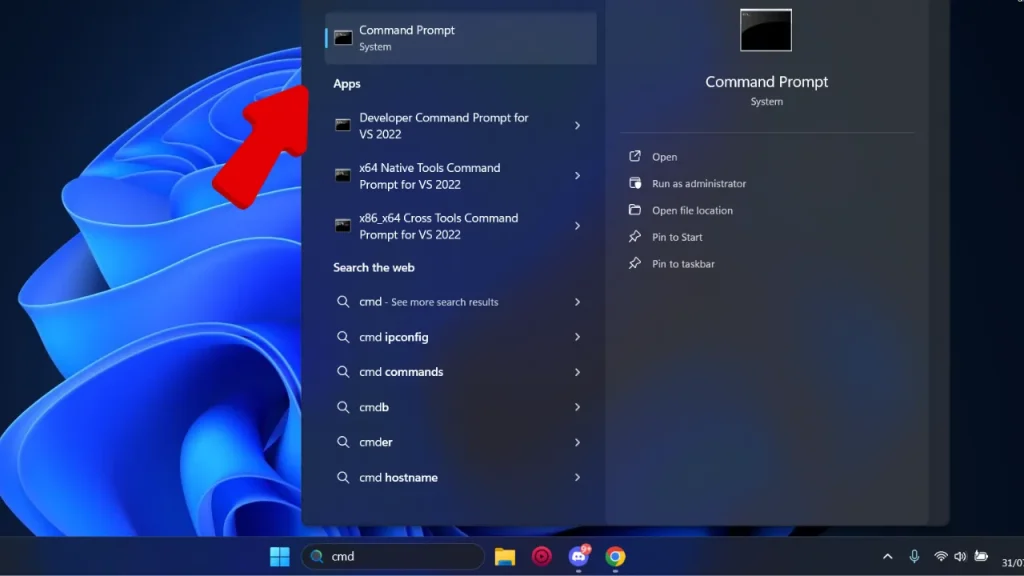
Ollama is a tool that lets you download almost any open-source AI model with just one simple command. If you’re using macOS or Linux, you'll find the respective options at the end of this guide.- Windows Download Ollama for Windows
- Double-click the
.exefile and follow the on-screen instructions. - Confirm the installation by opening Command Prompt or PowerShell and typing
ollama --version.
- Double-click the
2. Pull an AI Model from Ollama’s Library
-
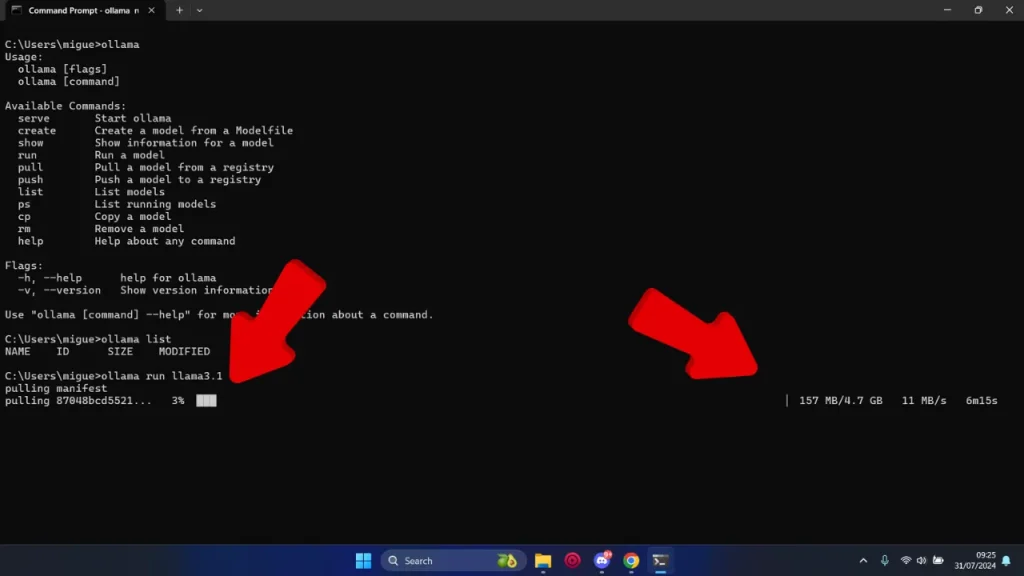
- Open your terminal or command prompt.
- Type one of the following commands:
ollama run openthinker:7bollama run openthinker:32b
3. Run a Model Locally
After downloading a model, starting it is as simple as executing the same command:ollama run openthinker:7b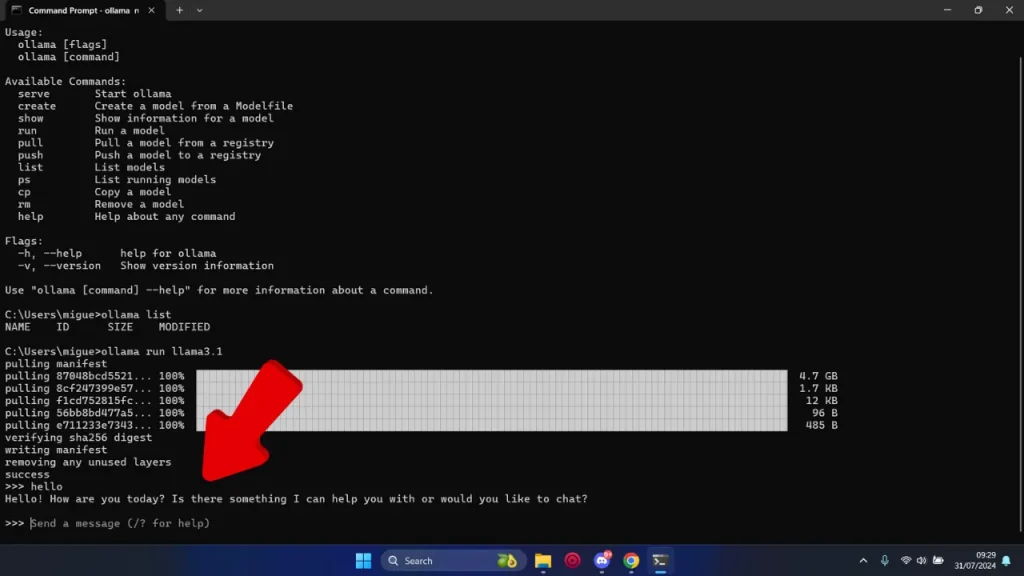
Other Options to Install OpenThinker
- macOS Download Ollama for macOS
- Unzip the file and run the installer in your Terminal (it usually includes a
.shscript). - That's it! Open your Terminal and type
ollama --versionto verify the installation.
- Unzip the file and run the installer in your Terminal (it usually includes a
- Linux
- Open a terminal window.
- Run the following command:
curl -fsSL https://ollama.com/install.sh | sh - Verify the installation by typing:
You should see the current version of Ollama.
ollama --version
What is OpenThinker?
At its core, OpenThinker is a series of open-source AI models developed by the Open Thoughts team—a collaboration between Bespoke Labs and the DataComp community. These models are designed to handle complex reasoning tasks and are fine-tuned from Qwen2.5 models using the OpenThoughts-114k dataset.Why is OpenThinker Important?
Unlike many proprietary models that require extensive resources, OpenThinker achieves state-of-the-art performance with significantly fewer training examples. For instance, OpenThinker-32B delivers superior results using only 114,000 training examples, compared to DeepSeek's 800,000.Key Features of OpenThinker AI Models
| Feature | OpenThinker-7B | OpenThinker-32B |
|---|---|---|
| Base Model | Qwen2.5-7B-Instruct | Qwen2.5-32B-Instruct |
| Fine-Tuned On | OpenThoughts-114k dataset | OpenThoughts-114k dataset |
| Parameters | 7.62 billion | 32.8 billion |
| Training Hardware | 4x 8xH100 nodes, 20 hours | 8xH100 P5 nodes, 90 hours on 4 nodes |
| Context Length | 16k tokens | 16k tokens |
| Performance | Outperforms Bespoke-Stratos-7B | Best open-data reasoning model to date |
| License | Apache 2.0 | Apache 2.0 |
Performance Benchmarks: How OpenThinker Stacks Up
The real measure of an AI model lies in its performance. Let’s examine how OpenThinker-7B and OpenThinker-32B fare against key benchmarks.OpenThinker-7B Performance
| Benchmark | Score |
| AIME24 | 31.3 |
| MATH500 | 83.0 |
| GPQA-Diamond | 42.4 |
| LCBv2 Easy | 75.3 |
| LCBv2 Medium | 28.6 |
| LCBv2 Hard | 6.5 |
| LCBv2 All | 39.9 |
OpenThinker-32B Performance
| Benchmark | Score |
| AIME24 I/II | 66.0 |
| AIME25 I | 53.3 |
| MATH500 | 90.6 |
| GPQA Diamond | 61.6 |
| LCBv2 | 68.9 |
Open-Source Advantages: Why OpenThinker Stands Out
One of OpenThinker’s biggest strengths is its open-source nature, which provides several key advantages:- Accessibility: Available to anyone without licensing fees or restrictions.
- Transparency: All datasets, training procedures, and model weights are publicly accessible.
- Community-Driven Innovation: Developers and researchers can contribute to and improve the model.
- Model Weights: Open Thoughts Hugging Face
- Datasets: OpenThoughts-114k
- Code: Open Thoughts GitHub
- Evaluation Tool: Evalchemy GitHub
Recent Developments: OpenThinker’s Growing Popularity
OpenThinker is gaining recognition in the AI community, with several notable updates:- February 14, 2025: OpenThinker now features an online playground for interactive testing.
- February 13, 2025: OpenThinker is available on Ollama for easy local inference.
- February 12, 2025